Best Monitors for Professionals 2025
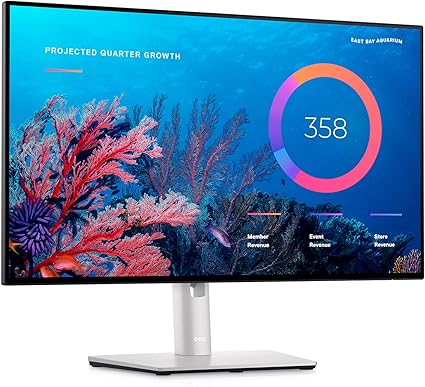

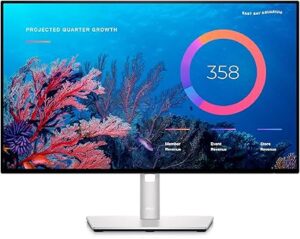
The Dell UltraSharp U2422HE 23.8-inch LCD Monitor is an advanced, high-performance display designed for professionals and users who seek top-tier visual quality in a compact and versatile package. With a blend of excellent color accuracy, sleek design, and a wide range of features, this monitor offers both style and substance for those in need of reliable and precise screen performance. In this article, we will provide a comprehensive overview of the Dell UltraSharp U2422HE, covering its design, display capabilities, connectivity options, performance, energy efficiency, and overall value for money.
Best Monitors for Professionals 2025
The Dell UltraSharp U2422HE is a 23.8-inch LCD monitor built to deliver exceptional color accuracy, sharpness, and versatility. As part of the UltraSharp series, it inherits the brand’s long-standing reputation for offering premium monitors designed for professional users in fields such as graphic design, photo editing, video production, software development, and more.
While it is compact at 23.8 inches, this monitor is far from being just a smaller option in the UltraSharp lineup. Its 1920×1080 Full HD resolution provides sharp visuals, while its IPS (In-Plane Switching) panel ensures vibrant colors and wide viewing angles. The monitor also comes with several advanced features, such as a USB-C port with power delivery, making it an excellent choice for modern workspaces that demand both functionality and performance.
Design and Build Quality
The design of the Dell UltraSharp U2422HE is one of its standout features. It features a minimalist, sleek, and professional aesthetic that is in line with Dell’s premium UltraSharp branding. The 23.8-inch size strikes an excellent balance, offering enough screen real estate for productivity without being too large for smaller workspaces.
The ultra-thin bezels surrounding the screen enhance the viewing experience by maximizing the usable screen area. This “InfinityEdge” design creates a near-borderless effect that is perfect for multi-monitor setups. Users can position multiple UltraSharp U2422HE monitors side by side with minimal distractions, creating a seamless and immersive display environment.
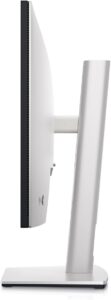
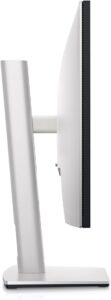
The stand is highly adjustable, offering tilt, swivel, height adjustment, and pivot features, allowing users to customize the monitor’s position to their preferred ergonomic angle. Whether you’re standing or sitting, the flexibility of the stand ensures that the monitor can be adjusted for comfortable viewing. The base of the stand is sturdy and well-built, ensuring stability even when adjustments are made.
Dell has used high-quality materials in the construction of the U2422HE, making it feel premium and durable. The matte black finish not only gives the monitor an elegant and understated appearance but also reduces glare and reflections, which is a key feature for professionals working in environments with various light conditions.
Display Performance and Visual Quality
The Dell UltraSharp U2422HE boasts a 23.8-inch Full HD display with a resolution of 1920×1080 pixels. While this resolution may not be as high as the WQHD or 4K models in the UltraSharp series, it still delivers sharp, clear images with excellent color reproduction. The 1920×1080 resolution is ideal for a wide range of tasks, from office work and web browsing to creative projects, where image clarity and precision are important.
At the heart of the U2422HE’s display is its IPS panel. IPS technology ensures superior color consistency and accuracy, even when viewed from wide angles. This is an important feature for professionals who require precise color matching in their work. Whether you’re editing photos or designing graphics, the monitor delivers vivid, lifelike colors that remain true across the screen.
The monitor offers 99% sRGB color coverage, which makes it an excellent choice for creative professionals working in color-sensitive fields. The accuracy of the color representation ensures that what you see on the screen closely matches the final output, making it suitable for tasks like photo editing, video production, and graphic design.
In terms of brightness, the U2422HE reaches up to 300 nits, which is sufficient for most indoor environments. It provides ample brightness for clear visibility and readability, even in well-lit rooms. However, it may not be as bright as some high-end monitors intended for HDR content. Still, for everyday productivity tasks and professional applications, the brightness level is more than adequate.
The monitor’s contrast ratio is also impressive, providing deep blacks and bright whites. This balance enhances the visual depth and makes the viewing experience more immersive, whether you’re working on intricate designs or simply watching videos.
Connectivity and Ports
The Dell UltraSharp U2422HE offers an impressive range of connectivity options, making it versatile and easy to integrate into modern work environments. It includes a USB-C port that supports both data transfer and power delivery, allowing users to connect compatible laptops or devices and charge them simultaneously. This feature is particularly useful for users who want to streamline their workspace and reduce cable clutter.
In addition to the USB-C port, the monitor comes with multiple video input options, including HDMI, DisplayPort, and a DisplayPort Out, which enables daisy-chaining multiple monitors. The flexibility of these connections makes it easy to use the U2422HE with a wide range of devices, including desktops, laptops, and workstations.
The U2422HE also includes several USB 3.2 ports, providing additional connectivity for peripherals like keyboards, mice, external drives, or USB flash drives. This is a convenient feature for users who need to connect multiple devices to their monitor without requiring additional hubs or adapters. There’s also a convenient USB upstream port that allows you to connect the monitor to your computer for data transfer.
For users who require audio, the U2422HE comes with a 3.5mm audio line-out port, which allows you to connect external speakers or headphones for an enhanced audio experience. However, like many professional-grade monitors, it does not have built-in speakers, which may require users to invest in external sound systems.
Performance and User Experience
The Dell UltraSharp U2422HE delivers an excellent overall performance for a variety of use cases. The IPS panel provides clear and consistent visuals, which are essential for tasks that require precision. The Full HD resolution strikes a perfect balance between clarity and performance, ensuring that text, images, and videos are sharp without putting too much strain on the system’s GPU.
While the monitor features a 60Hz refresh rate and a 8ms response time, it is not designed for fast-paced gaming. If you are a professional gamer, you may need a monitor with a higher refresh rate for smoother gaming experiences. However, for general office work, photo editing, video editing, and design work, the U2422HE’s performance is more than sufficient.
The monitor’s color accuracy and vibrant display make it an excellent choice for content creation. Whether you’re designing graphics or editing images, the U2422HE offers the precision needed for high-quality work. The wide viewing angles also make it an excellent monitor for collaborative work, as multiple people can view the screen simultaneously without experiencing any color shift or distortion.
One of the most notable aspects of the U2422HE is its ergonomic design. The height-adjustable stand, tilt, swivel, and pivot functions allow users to fine-tune the monitor’s position to suit their preferred working posture. This makes it a great choice for individuals who spend long hours in front of the screen, as it helps to minimize strain and discomfort.
Energy Efficiency and Environmental Impact
As part of Dell’s commitment to sustainability, the UltraSharp U2422HE is designed with energy efficiency in mind. The monitor is certified with Energy Star and TCO Certified, which means it meets high standards for energy savings and environmental sustainability.
The U2422HE uses LED backlighting, which consumes less energy compared to traditional CCFL backlit displays. This results in lower energy consumption, making the monitor more eco-friendly while still delivering high-quality performance.
The monitor is also free from harmful materials such as mercury, arsenic, and PVC, further enhancing its appeal for users who are concerned about environmental impact. Dell’s commitment to sustainability ensures that the UltraSharp U2422HE is a responsible choice for both personal and professional use.
Pricing and Value for Money
The Dell UltraSharp U2422HE is positioned as a mid-range monitor, making it an attractive option for professionals who require precise color accuracy and sharp visuals without breaking the bank. While it may be priced higher than basic monitors, the U2422HE offers significant advantages in terms of build quality, color accuracy, ergonomics, and connectivity options.
For professionals in design, video editing, photography, or programming, the investment in the U2422HE is worthwhile due to its exceptional display performance and long-term durability. Its wide range of features and superior color accuracy justify its price, making it a valuable asset for users seeking to improve their productivity and work quality.
Conclusion
The Dell UltraSharp U2422HE 23.8-inch LCD monitor is a fantastic choice for professionals and everyday users alike who need a reliable, high-performance display. With its impressive color accuracy, sleek design, ergonomic features, and versatile connectivity options, it provides great value for users who require precise and sharp visuals.
While not the best choice for high-end gaming, the U2422HE excels in professional applications such as graphic design, photo editing, and content creation. Its energy-efficient design and eco-friendly certifications further enhance its appeal for environmentally conscious users. Overall, the Dell UltraSharp U2422HE is a premium monitor that combines functionality, style, and value, making it an excellent investment for a wide range of users.
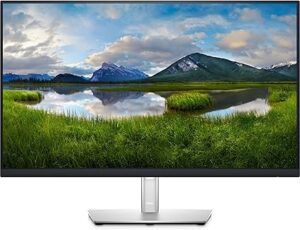
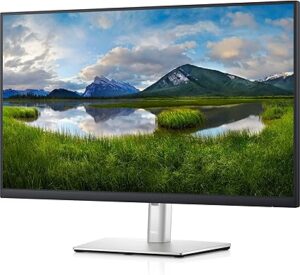
The Dell P2721Q 27-inch 4K UHD Monitor is a premium display that offers exceptional resolution, color accuracy, and versatile connectivity. With a sleek design and robust features, the P2721Q is aimed at professionals who require high-quality performance for tasks such as graphic design, video editing, content creation, programming, or even general productivity. With its 4K resolution, ultra-thin bezels, and a wide range of connectivity options, this monitor has been designed to provide an optimal viewing experience in any modern workspace.
In this detailed review, we will break down the Dell P2721Q monitor’s design, display capabilities, connectivity, performance, and value for money, helping potential buyers understand whether this display suits their needs.
Introduction to the Dell P2721Q 27-inch Monitor
The Dell P2721Q is a 27-inch monitor that features a 4K UHD (3840×2160 pixels) resolution. This high resolution is four times the pixel density of a Full HD display, making it an excellent choice for professionals who work with high-definition content. Whether you are editing high-quality images or videos, working on graphic design projects, or simply need a sharp and clear display for multitasking, the P2721Q delivers. The IPS (In-Plane Switching) panel ensures accurate color reproduction and wide viewing angles, making it suitable for those in creative fields, as well as professionals who need precision in their work.
This monitor is also built to offer an immersive viewing experience, thanks to its ultra-thin bezels and minimalist design. Additionally, its IP certification for dust and water resistance means it is a durable and reliable option for work environments that may expose it to minor environmental factors.
Design and Build Quality
The design of the Dell P2721Q monitor stands out with its sleek, modern aesthetics and professional appeal. Its 27-inch size is perfect for those who need a balance between screen real estate and desktop space. Whether you use it as a standalone monitor or as part of a multi-display setup, the ultra-thin bezels around the screen create a nearly borderless viewing experience, providing a more immersive feel and reducing distractions.
The stand is designed to be ergonomic and highly adjustable, offering the ability to tilt, swivel, rotate, and adjust the height. This level of adjustability is key for professionals who spend long hours in front of their screens and need to ensure they are working at an optimal ergonomic angle. The monitor can be rotated into portrait mode for tasks like coding or reading long documents, providing even greater flexibility.
The color of the P2721Q is a sophisticated silver-gray, which gives it a premium look and feel. The high-quality materials used in its construction ensure that the monitor feels sturdy and durable. Dell has designed the monitor to be VESA-compatible, which means it can be mounted on compatible arms or wall mounts, offering even greater flexibility in how it’s positioned within your workspace.
Overall, the build quality is strong, and the materials used ensure the monitor can stand up to regular use without showing signs of wear quickly.
Display Quality and Performance
One of the most impressive aspects of the Dell P2721Q is its 4K UHD resolution. With a pixel count of 3840×2160, this monitor provides incredibly sharp images and crisp text, making it perfect for tasks that require precision and clarity. Whether you’re editing high-resolution photos, working on video projects, or simply multitasking across several applications, the sharpness of 4K resolution allows for maximum productivity.
The IPS panel used in the P2721Q is another highlight. IPS technology ensures that colors are vivid, accurate, and consistent across the entire screen. Whether you are viewing the screen head-on or from an angle, the P2721Q ensures that the color and brightness remain consistent, making it ideal for creative professionals who require color accuracy for their work.
The color coverage of the P2721Q is also impressive. It covers 99% of the sRGB color space, which is the standard color gamut for most content creation. This makes it an excellent choice for those who are involved in tasks like photo editing, video editing, graphic design, and web development, where accurate colors are essential for achieving the best results.
The brightness of the monitor reaches 350 nits, which is more than sufficient for indoor environments. While this may not be as bright as some high-end monitors aimed at HDR content, it is more than enough for the average user, even in rooms with significant ambient light.
With a 60Hz refresh rate and 8ms response time, the P2721Q is not designed for high-performance gaming, as these specifications may not meet the needs of competitive gamers who require faster refresh rates. However, for general productivity and professional tasks, the refresh rate and response time are more than adequate. This makes the P2721Q a solid choice for anyone who is looking for a monitor focused on professional work rather than gaming.
The contrast ratio of the P2721Q is decent, providing deep blacks and bright whites, which makes the screen more immersive and suitable for multimedia content. The clarity and color consistency across the display make it a highly productive tool for any kind of creative or professional work.
Connectivity Options and Ports
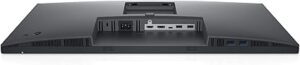
The Dell P2721Q offers a wide range of connectivity options, ensuring that it is versatile and capable of handling various devices. The inclusion of a USB-C port is particularly noteworthy, as this port not only allows for data transfer but also provides power delivery. Users can connect a compatible laptop or device to the monitor and charge it simultaneously, reducing cable clutter and simplifying desk setups.
In addition to the USB-C port, the P2721Q features HDMI and DisplayPort inputs, allowing you to connect the monitor to multiple devices simultaneously. The presence of DisplayPort 1.2 also supports daisy-chaining, allowing you to connect additional monitors in a multi-display setup with just a single cable running to the primary monitor. This is particularly useful for professionals who require extended screen real estate for productivity.
The monitor also features a USB 3.2 hub with several USB ports, providing the convenience of connecting peripherals such as a keyboard, mouse, or external drives directly to the monitor. This eliminates the need for additional hubs and keeps your workspace tidy.
Furthermore, there is an audio line-out port, allowing you to connect external speakers or headphones if you require better audio performance. However, it is worth noting that the P2721Q does not come with built-in speakers, which may be a drawback for some users who prefer an all-in-one solution without the need for external audio equipment.
Durability and Resistance
The Dell P2721Q has an IP rating for water and dust resistance, which is a key feature that sets it apart from many other monitors in its category. This makes the monitor an excellent choice for work environments where dust, moisture, or other environmental factors could potentially damage the device. While the P2721Q may not be fully waterproof, its resistance to these elements ensures that it will perform reliably in moderately demanding conditions.
This IP-rated resistance provides added peace of mind, particularly for users in industries such as manufacturing, design studios, or other fields where exposure to dust or moisture is common. The durability factor extends the lifespan of the monitor, making it a worthwhile investment for any professional workspace.
Pricing and Value for Money
The Dell P2721Q is positioned as a mid-to-high-end 4K monitor, and its price reflects the premium features and build quality it offers. While it may be more expensive than entry-level 1080p monitors, it provides significant value for money for professionals who require a high-resolution display with color accuracy and reliable connectivity options.
Considering the combination of features such as 4K resolution, IPS panel technology, USB-C connectivity, and IP-rated durability, the Dell P2721Q offers excellent performance, build quality, and versatility. For creative professionals, content creators, and office workers who need a monitor that supports high-resolution work with color precision, the P2721Q represents a solid investment.
Conclusion
The Dell P2721Q 27-inch 4K UHD Monitor is a highly capable and feature-rich display that offers great value for professionals and creators. With its stunning 4K resolution, IPS panel technology, color accuracy, and robust connectivity options, it provides a solid performance for a variety of tasks, including graphic design, video editing, photo editing, and multitasking. The USB-C port, adjustable stand, and IP-rated durability make it an even more attractive choice for those who require a high-quality and reliable monitor.
While it may not be suitable for high-end gaming, the Dell P2721Q excels in areas where clarity, color accuracy, and reliability are paramount. Whether you are working from home, in an office, or in a professional creative studio, the P2721Q offers everything you need in a premium display. Its competitive price ensures that you get excellent performance without breaking the bank, making it a smart choice for any professional workspace.





Post Comment